Controls
This page goes over the controls for Deeptower.
Basic Controls
- WASD: Move
- Left Click: Inspect
- Left Click + Drag: Look around
- Right Click: Sheathe/Unsheathe weapon (Unavailable until obtaining the Sword)
- Right Click + Drag: Swing weapon (only works when the weapon is unsheathed). Try holding right click and waving your mouse a bunch for consecutive swings!
- E: Open/close inventory
- ~ or \: Open/close debug console
User Interface
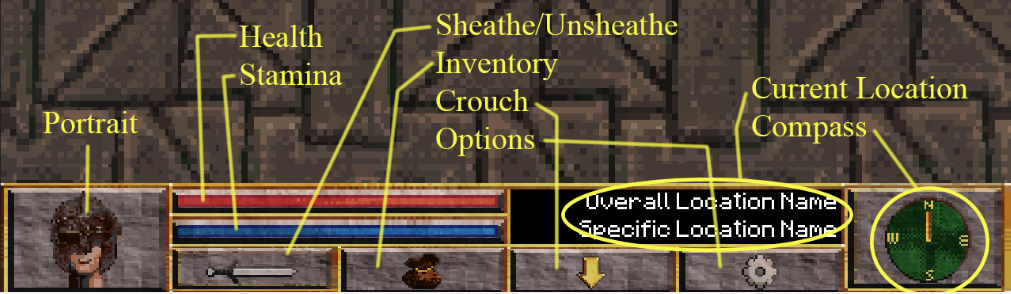 Deeptower's UI Deeptower's UI |
|---|
- Portrait: Hero1
- Red Bar: Health
- Blue Bar: Stamina
- Black Box: Displays your current location
- Sword: Sheathe/Unsheathe weapon (Unavailable until obtaining the Sword)
- Pouch: Open inventory
- Arrow: Crouch
- Gear: Options
- Compass: Shows which direction you’re facing
Debug Console
 Debug_Console Debug_Console |
|---|
Deeptower ships with the original debug console intact2. To open/close the
console, use the ~ or \ keys on your keyboard.
Enter the respawn command into the console at any time to reset your character's position. This can be helpful if you
ever find yourself stuck somewhere.
-
Why the hero is wearing a helmet and seemingly no gorget, indicating a lack of body armor, is a mystery to me. Maybe he couldn’t afford the rest. Or his neck is really long and we can’t see the gorget. ↩
-
This was probably a last-minute oversight on the part of Experitech, given their rushed production schedule. But it makes our lives a lot easier in-game. ↩